

Food Delivery in China 2026: Meituan Guide for Foreigners
Order food delivery in China in 2026 with Meituan and Taobao Flash Purchase, including registration, translation, hotel tips, and Alipay or WeChat Pay.

–8 min read
Food Delivery in China 2026: Meituan Guide for Foreigners
Order food delivery in China in 2026 with Meituan and Taobao Flash Purchase, including registration, translation, hotel tips, and Alipay or WeChat Pay.
–8 min read
Introduction to Food Delivery in China
Foreigners visiting or working in China are often amazed: ordering takeout here is incredibly convenient — almost like magic!
China has the world's largest food delivery market, with over 550 million users (more than half of all internet users have tried it). The main platforms are Meituan, Taobao Flash Purchase (formerly Ele.me), and JD Takeout.
These apps cover everything from major cities to small counties and even some rural towns.
- High service quality: Most orders arrive within 30 minutes. Food comes in insulated bags to stay warm, spills are rare, and you get real-time tracking, rider location, user reviews, and growing transparency around food safety (many restaurants offer live kitchen streaming).
- Extremely wide coverage: It’s not just Chinese food — you can get Western food, hotpot, pizza, breakfast, late-night snacks, groceries, fresh fruit, medicine, flowers, and even KFC or Starbucks. No matter if you're at a hotel or a tourist spot, delivery usually arrives in about 30 minutes, creating a true “30-minute lifestyle circle.”
In short: With a food delivery app in China, you can get almost anything you want to eat, anytime, anywhere — fast, affordable, and with tons of choices. It’s one of the everyday conveniences that foreign visitors love most when they come to China!
Since Meituan and Taobao Flash Purchase are the most convenient and efficient ways to order takeout, we’ll only cover how to use these two apps. Other platforms like JD Takeout can be explored on your own — ordering takeout in China is really not difficult at all.
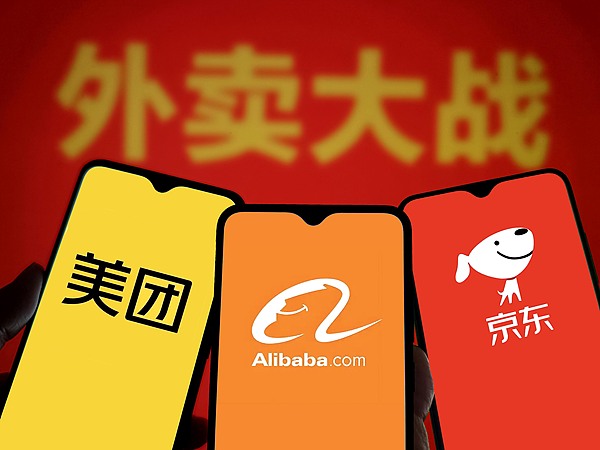
Meituan vs Taobao Flash Purchase (formerly Ele.me)
Not sure what WeChat, Alipay, or Mini Programs are? See the FAQ section
Meituan
- The main Meituan app itself does not support English, but you can use the Meituan Mini Program inside WeChat, where WeChat’s built-in translation feature lets you switch the page to English.
Note: In the Mini Program, you can only pay with WeChat Pay (you’ll need to register a WeChat account and link a bank card to it).
- Supports direct registration with an international phone number.
- Payment options include directly linking an international bank card, Alipay, WeChat Pay, and more.
Taobao Flash Purchase
Important: We are referring to the Taobao Flash Purchase app, not the main Taobao app. In our tests, the main Taobao app may show a “service not available” message when registering with a foreign phone number.
- The app does not support English, and the Mini Program inside Alipay also does not offer an English switch.
- Supports direct registration with an international phone number.
- Payment options include Alipay and WeChat Pay. To use a international bank card, you must first register Alipay or WeChat and link your card there.
Summary
In short, there is no single “perfect” solution that fixes every issue.
My personal recommendation: Use the Meituan Mini Program in WeChat — the interface can be translated to English, but you’ll need to set up WeChat and link a bank card first.
Alternatively, use the Meituan app directly and handle the Chinese interface yourself (e.g., with screenshot translation tools).
Here are some helpful references you might find useful:
How to Solve the Translation Problem
- Use AI apps with screen-sharing features—they can help you translate in real time and provide the information you want to know.
- Use translation software like Google Translate that supports image upload: manually take a screenshot and upload it to the translation software for translation.
- Or any other ways you can think of—go for it, Homo sapiens!
How to Use Meituan
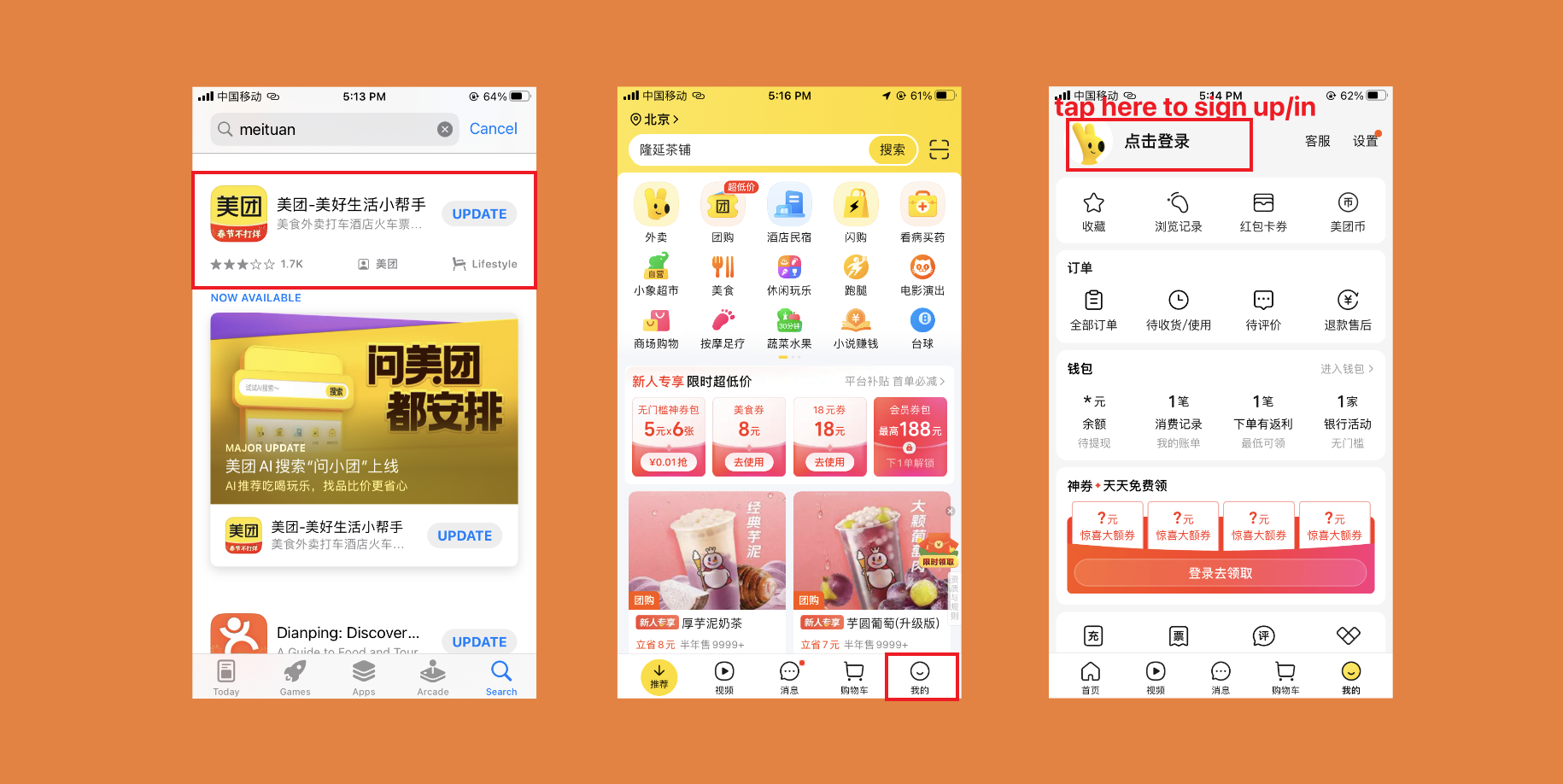
Download and Register the App
If you choose to use the WeChat Mini Program, skip this step
- Search for "meituan" in the Apple App Store or Google Play.
- Open the app, tap the 【My】 button in the bottom left corner to register and log in.
Open the Mini Program
- If you choose to use the mobile app, skip this step
- You can also open this Mini Program in Alipay, but it does not support translation and requires payment via Alipay
For registering WeChat or Alipay, refer to:
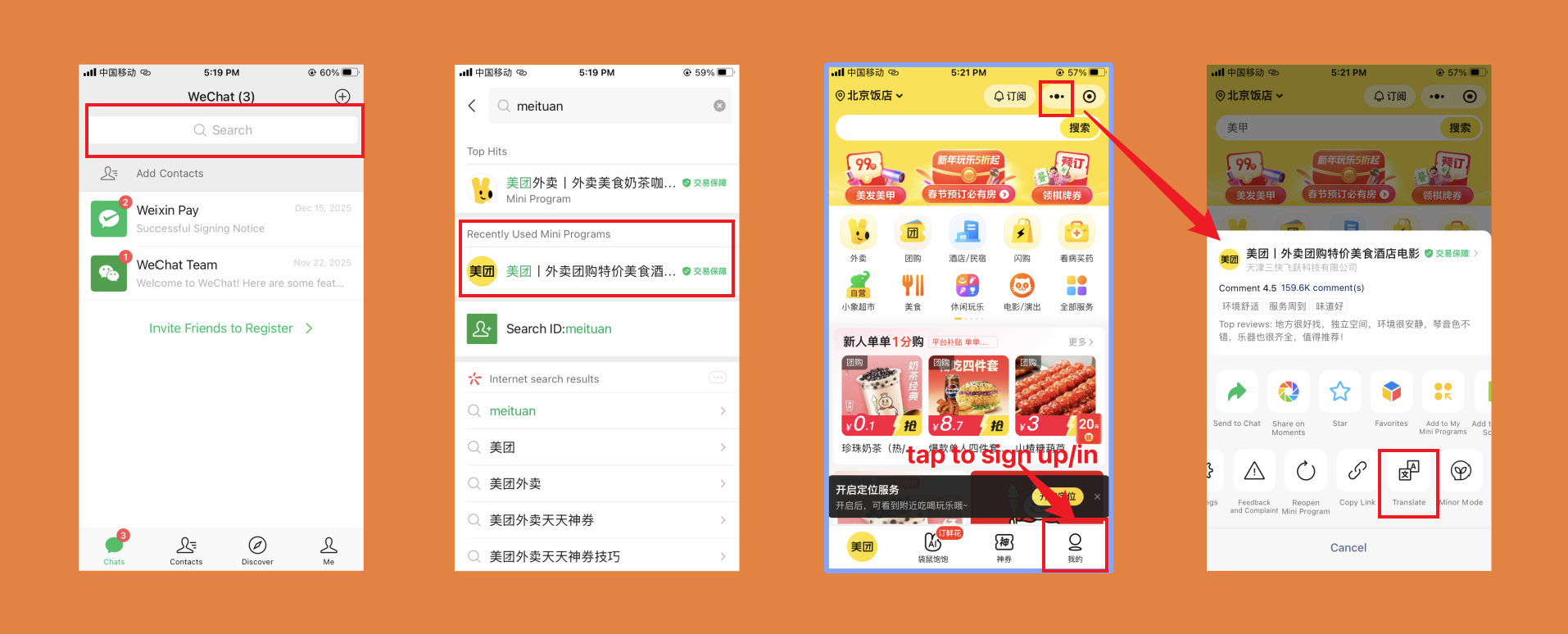
- Open WeChat, search for "meituan" in the top search bar, and open the Mini Program.
- Once opened, tap the 【My】 button in the bottom left corner to register and log in.
- Tap the button in the top right corner, find the translation function, and it will translate the entire page into your preferred language.
Place an Order and Pay
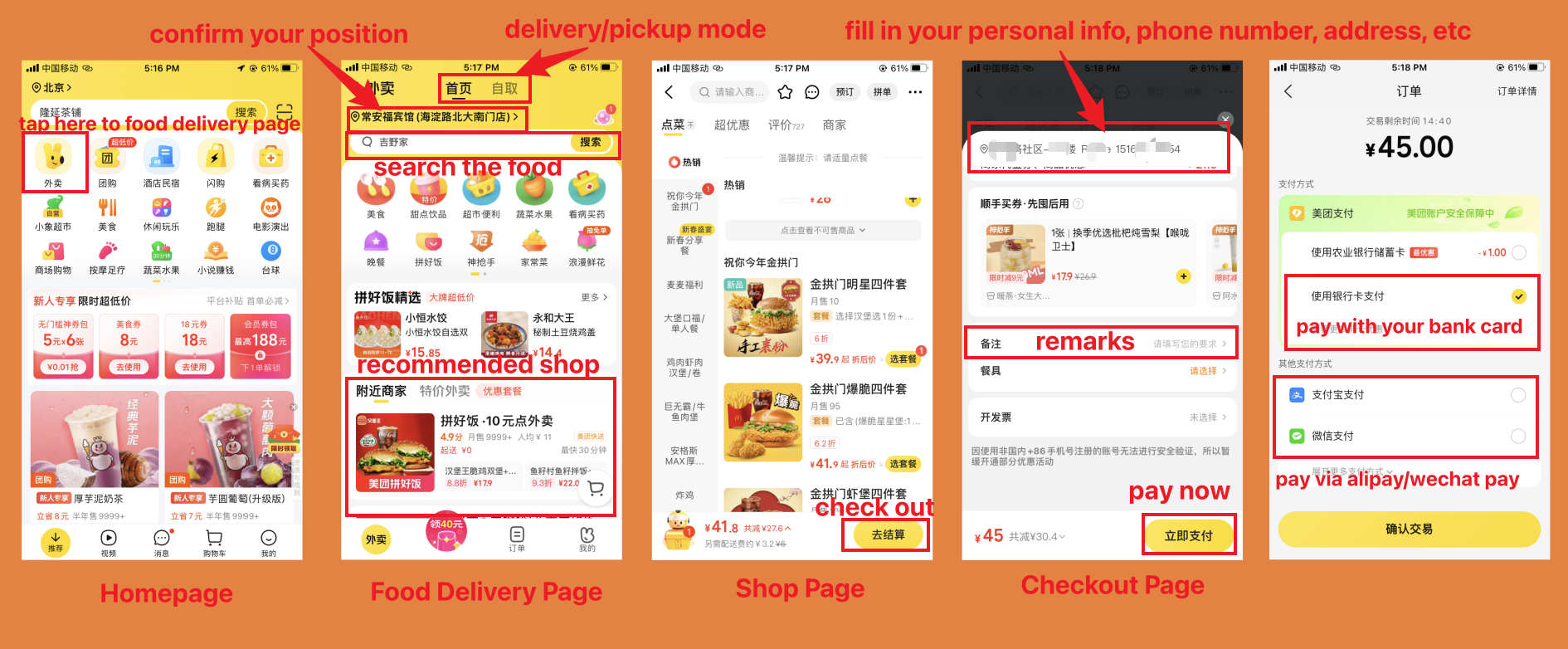
- Go back to the home page and tap 【food delivery】 to enter the food delivery page.
- Confirm whether the app's detected location matches where you want to order from (this ensures you see restaurants that can actually deliver to you).
- It defaults to food delivery mode, but you can switch to pickup mode if you prefer—just order remotely and pick it up at the store yourself.
- Search in the search bar (tested: only supports Chinese characters or pinyin) or browse the recommended list of restaurants.
- Enter a restaurant and add the dishes you want.
Note: Each restaurant has a minimum order amount or required items (like disposable tableware). You must meet these conditions to proceed to payment.
- Tap 【Go to Checkout】 to place the order. You need to fill in your address, name, and phone number so the delivery person can find you.
Note: The phone number here only supports Chinese mainland numbers. You can use a friend's number, the hotel front desk number, or even enter any valid Chinese-format number—but make sure the delivery person can locate you based on the address.
- If you have any preferences (e.g., less spicy, no onions), add them in the remarks section for the restaurant or delivery person.
- Tap 【Pay Now】in the bottom right corner and pay using a bank card, WeChat Pay, or Alipay.
- After payment, you can track the food's location in real time. Be ready to answer phone calls.
How to Use Taobao Flash Purchase
Download and Register the App
If you choose to use the Alipay Mini Program, skip this step
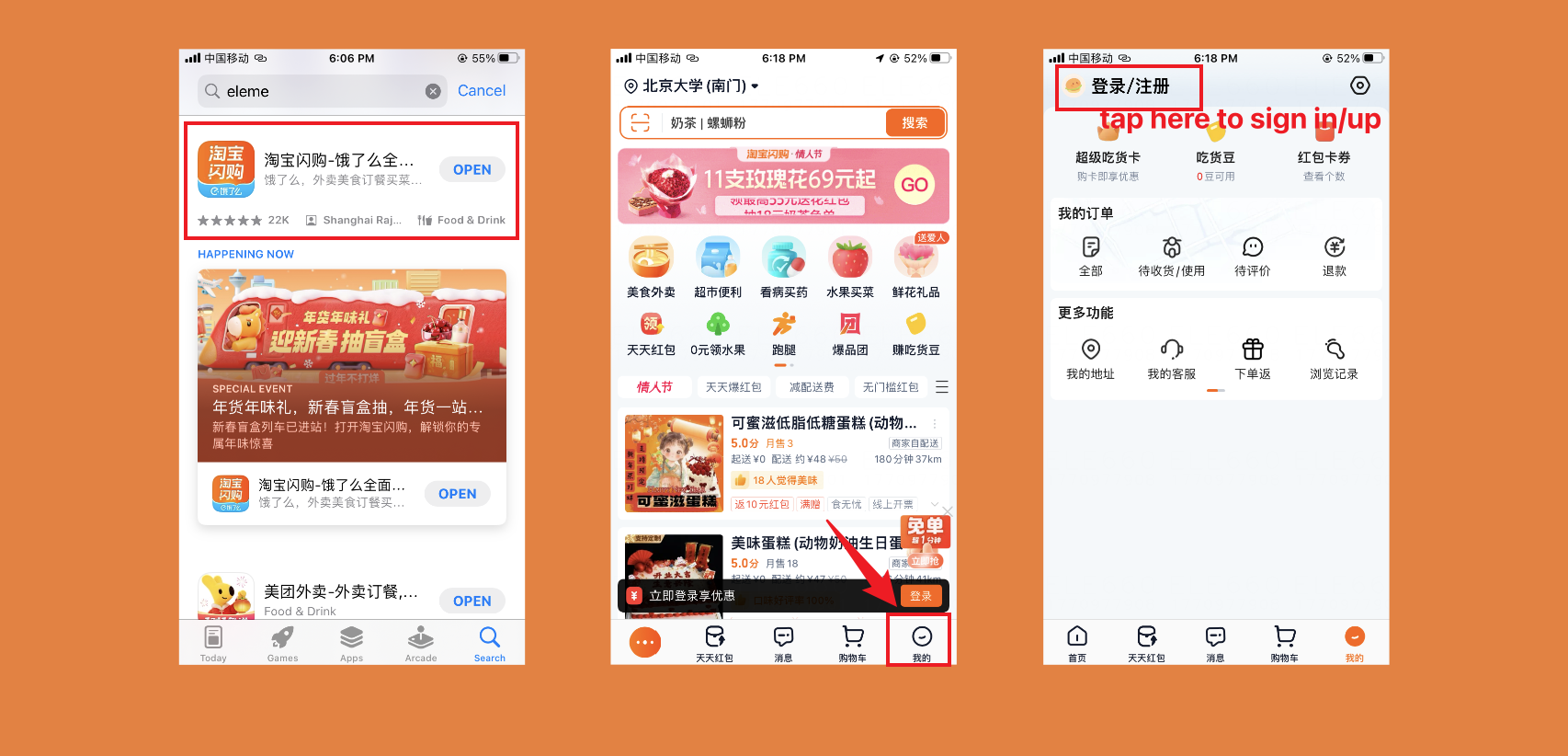
- Search for "eleme" in the Apple App Store or Google Play.
- Open the app, tap the 【My】 button in the bottom left corner to register and log in.
Open the Mini Program
You can also use that Mini Program in WeChat
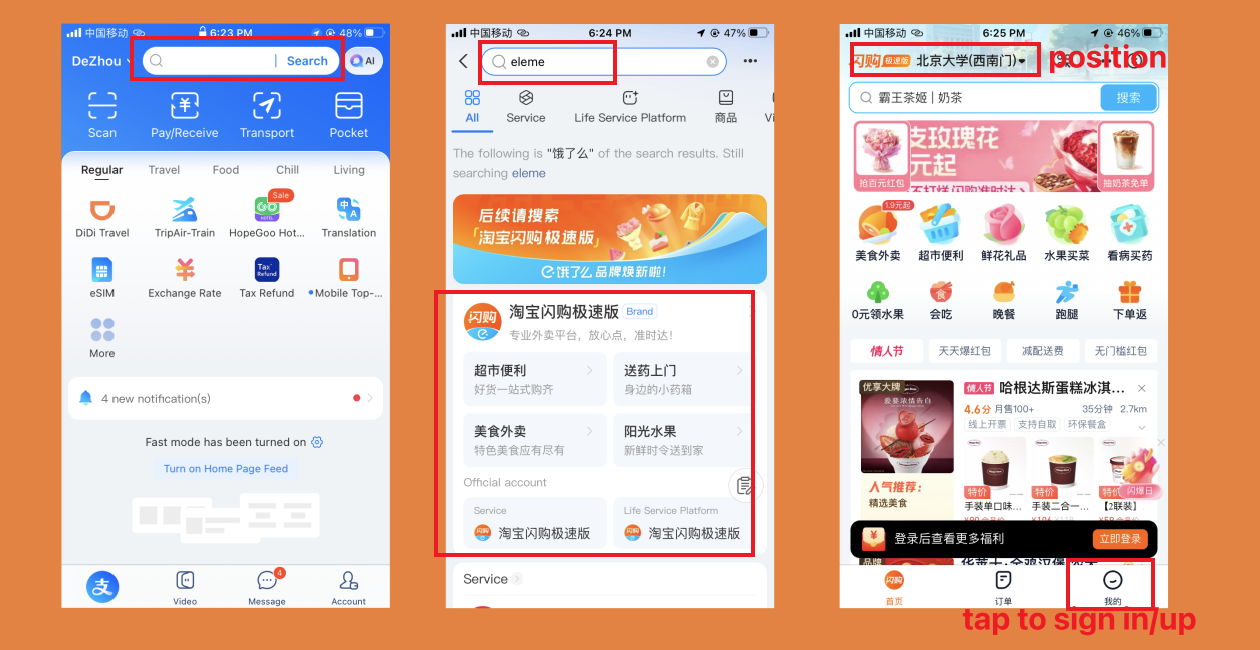
- Open Alipay, search for "eleme" in the top search bar, and open the Mini Program.
- Once opened, tap the 【My】 button in the bottom left corner to register and log in.
Place an Order and Pay
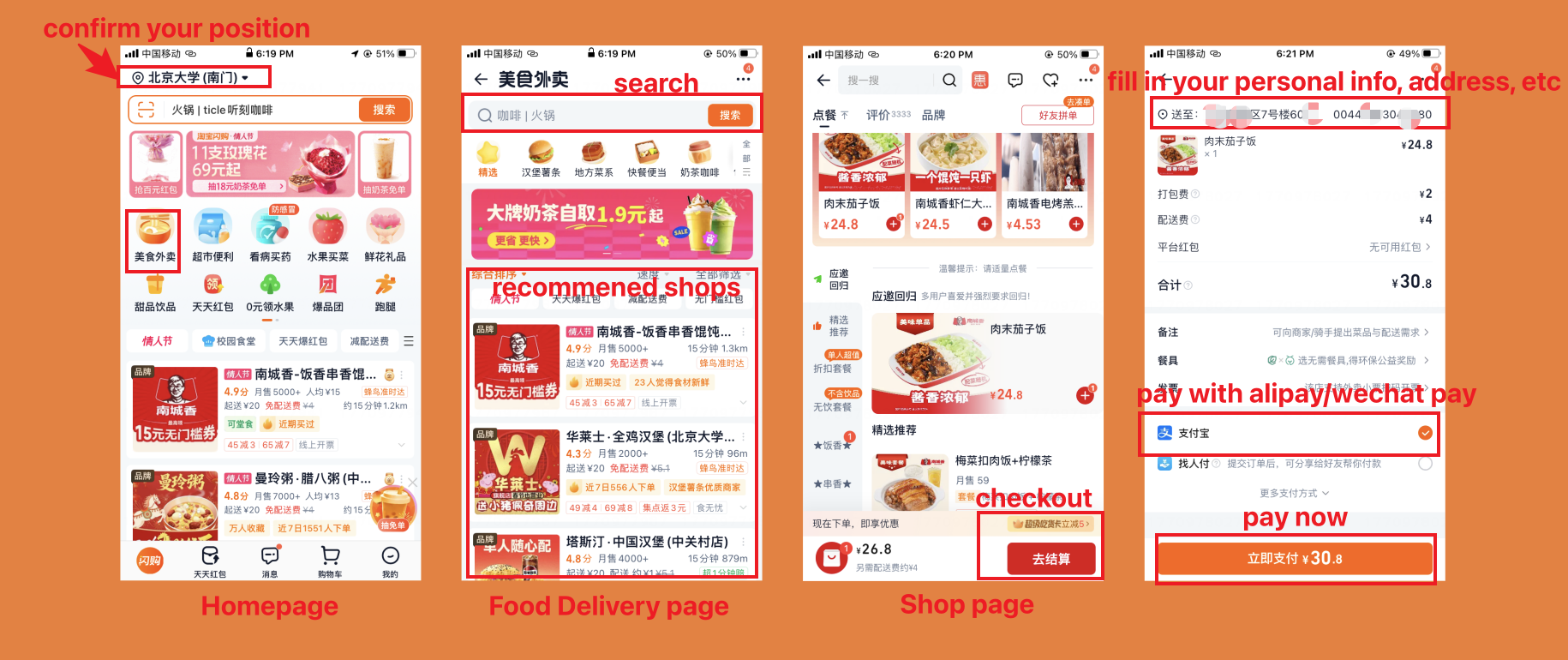
- Return to the home page and confirm whether the app's detected location is the address where you want to order food (this ensures the restaurants you see can actually deliver to you).
- Tap 【food delivery】 to enter the food delivery page.
- Search in the search bar (tested: only supports Chinese characters or pinyin) or browse the recommended list of restaurants.
- Enter a restaurant and add the dishes you want.
Note: Each restaurant has a minimum order amount or required items (such as disposable tableware). You must meet these conditions before you can proceed to payment.
- Tap 【Go to Checkout】 to place the order. You need to fill in your address, name, and phone number so the delivery person can find your location.
Note: You can enter an international phone number here, but delivery riders are generally not familiar with international numbers and may not be able to reach you. You can use a friend's number, the hotel front desk number, or simply enter any number in valid Chinese format—but make sure the delivery person can locate you based on the address information.
- If you have any preferences (e.g., less spicy, no cilantro), add them in the remarks section for the restaurant or delivery person.
- Tap 【Pay Now】 in the bottom right corner and pay using Alipay or WeChat Pay.
Please note: Direct payment with a bank card is not currently supported, so you need to register Alipay or WeChat and link your card in advance.
- After payment, you can track the food's location in real time. Be ready to answer incoming phone calls.
Frequently Asked Questions
What is the relationship between Taobao Flash Purchase and Ele.me?
Taobao Flash Purchase is the former Ele.me. Starting in 2025, the Ele.me app was fully upgraded and renamed Taobao Flash Purchase, but the core team and services remain the same.
What are Alipay, WeChat, and Mini Programs?
- Alipay: China's most popular mobile payment app, used for scanning to pay, ordering takeout, and more.
- WeChat: China's version of WhatsApp + Facebook, for chatting, payments, and opening Mini Programs.
- Mini Programs: Small apps inside WeChat or Alipay (like the Meituan Mini Program) — no need to download a separate app; you can order takeout, shop, and more directly inside WeChat or Alipay. Very convenient!
For more details, refer to:
Written by
Richie Shi
I’m Richie. I help foreigners solve problems related to China. Feel free to reach out directly.
Recommended articles
All guidesHow to Book Hotels in China as a Foreigner: 2026 GuideCompare Trip.com, Agoda, Booking.com, Expedia and local hotel apps, then avoid issues with foreign guest policies, passports, credit cards and deposits.Richie Shi China SIM Card, eSIM or Roaming? 2026 Guide for ForeignersCompare China SIM cards, eSIMs, and roaming in 2026, with airport vs city buying tips, carrier choices, passport rules, and VPN advice.Richie Shi
 How to Book China High-Speed Rail Tickets in 2026Book China high-speed rail tickets as a foreigner with passport tips, Trip.com vs 12306, 15-day sales, reservations, payment options, and boarding steps.Richie Shi
China SIM Card, eSIM or Roaming? 2026 Guide for ForeignersCompare China SIM cards, eSIMs, and roaming in 2026, with airport vs city buying tips, carrier choices, passport rules, and VPN advice.Richie ShiHow to Book China High-Speed Rail Tickets in 2026Book China high-speed rail tickets as a foreigner with passport tips, Trip.com vs 12306, 15-day sales, reservations, payment options, and boarding steps.Richie Shi